
Three ways to play
H on the host's keyboard moves between them, whenever the party is ready for the next.

Puppet
Be the character. Wave and it waves back. Spin and it spins. Crouch, bow, dance, and keep jumping to fly.
Shape draw
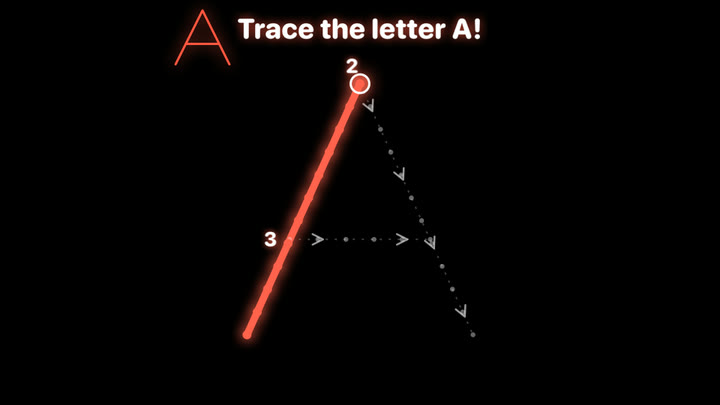
Hold a glowing ball and trace a shape, letter, number or animal until every dot lights up.
Free draw
Paint the big screen with a glowing ball in bright, crisp lines. A jump wipes it clean for the next picture.
Shapes, letters, numbers and animals
Shape draw has four sets: fun shapes, the alphabet, numbers and animal outlines. Choose one on the host's screen, or press T. Letters and numbers are traced the way they are written, each stroke from its numbered start and along its arrows, with the ink following the ball. The drawing happens in a small window in front of you, so easy movements cover the whole screen.



Meet the characters
Each child gets their own, and the host can swap them with a key.
Tap a character to send them out for a walk along the bottom of the page. Tap one walking for a ta-da.
Setting up
A Mac
Apple silicon, running macOS 27 or later.
A camera
The built-in one works. An iPhone through Continuity Camera gives the smoothest picture: keep it on its cable and in a fixed mount.
A big screen
A TV or second display for the stage. The app puts the stage there by itself and keeps the host's console on the Mac.
A glowing ball
For the drawing games: a light-up ball in a solid colour, such as a juggling or poi ball in red, green, blue, light blue or purple. One per hand, or one each. Puppet mode needs nothing to hold.
Room to move
A bright room and two or three metres of open floor, whole bodies in view if you can.
The host's keys
If something is wrong
- No character appears: step further back so your whole body is in the picture, and add light.
- "The camera is not allowed": System Settings › Privacy & Security › Camera, and switch the app on.
- The iPhone camera stops: unplug its cable and plug it back in; the app picks it up again by itself.
Private by design
The camera picture never leaves the Mac. It is never shown on the big screen and never saved. Photo cards show the characters only. Nothing is collected: no accounts, no adverts, no purchases, no internet needed. The privacy policy says exactly what the app does, and age suitability who it is for (everyone from about three).
Contact
lilysparty@cadencevideoplayer.com. What happened, and which Mac, is all we need.